
5 Camera Settings for Portraits, From Aperture to Lens
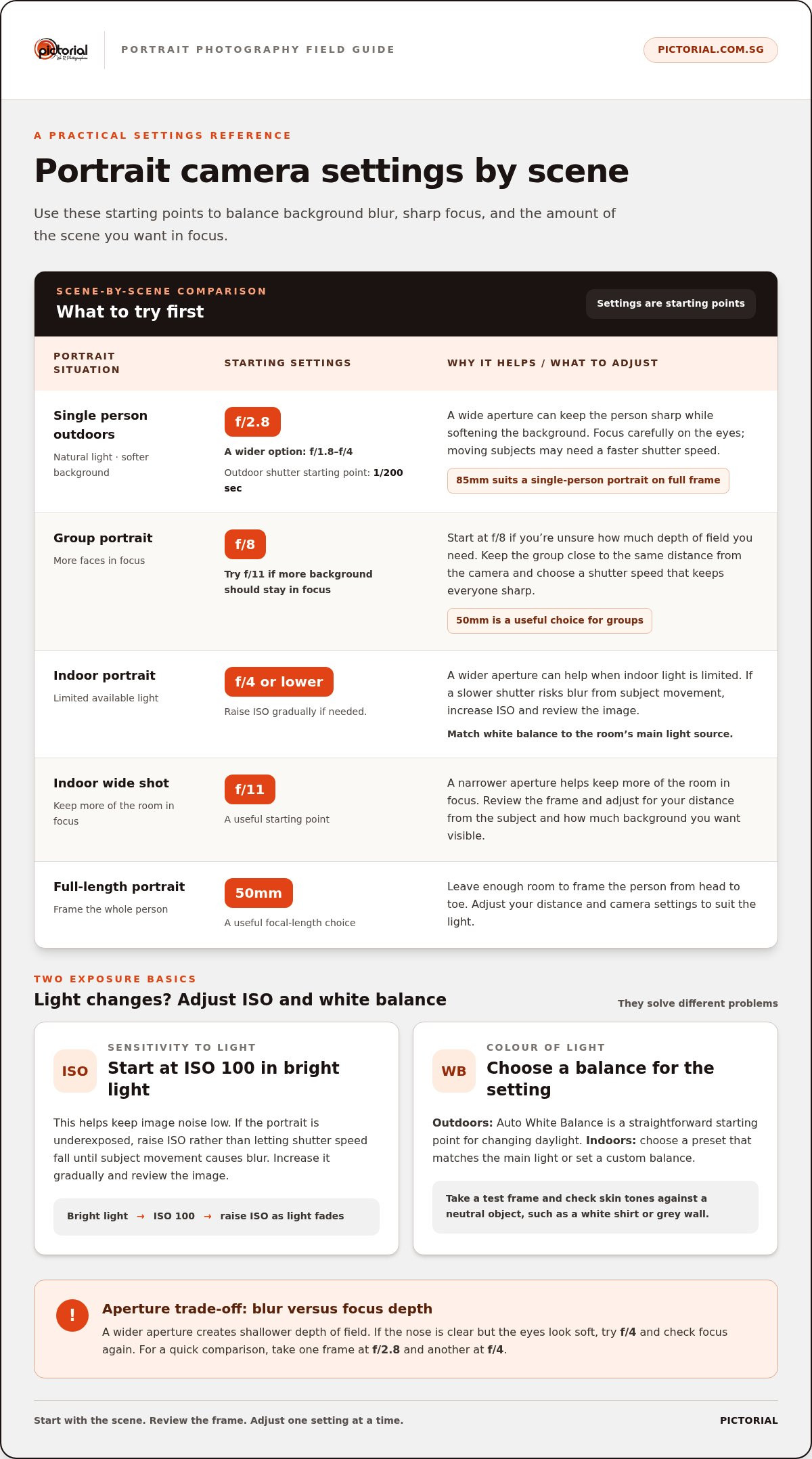
A practical starting point for the best camera settings for portraits is f/2.8, ISO 100 in bright light, and Auto White Balance, with a shutter speed fast enough to keep your subject sharp. An 85mm lens suits a single-person portrait on a full-frame camera, while 50mm is a useful choice for full-length portraits and groups. For a group, or when you want more of the scene in focus, try f/8.
It can feel like a lot to balance at once, especially when the light changes or you’re trying to fit a person from head to toe in the frame. The good news is that the best camera settings for portraits are starting points, not a test you have to pass in one shot. A small adjustment can soften the background, keep faces clear, or bring more of the scene into focus.
This guide covers aperture, white balance, ISO, focal length, and practical settings for full-length portraits. You’ll learn what to try first and what to change when the light, subject, or framing calls for it, so you can spend less time guessing and more time making the portrait you have in mind.
Key Takeaways
- Choose a wider aperture for a softer background, then narrow it when you need more of the scene or more faces in focus.
- Use Auto White Balance as a straightforward outdoor starting point; indoors, match the setting to the room’s lighting.
- Raise ISO when dim light would otherwise force a shutter speed that risks blur, then adjust it as the light changes.
- Match focal length to your camera’s sensor format and the framing you want, rather than choosing a lens by its number alone.
- For full-length portraits, leave enough room to frame the whole person and adjust your distance and settings to suit the light.
1. Aperture and depth of field
Aperture controls how much light enters the lens and how much of the scene appears in focus. It’s shown as an f-number: a smaller number, such as f/2.8, means a wider aperture. For an individual outdoor portrait, an aperture below f/4 can create shallow depth of field, keeping the person sharp while softening the background.
To blur the background, start around f/2.8. A wider setting between f/1.8 and f/4 can also separate your subject from the surroundings. Focus carefully on the eyes, because a very wide aperture leaves less room for a face to stay sharp. If the nose is clear but the eyes look soft, try f/4 and check focus again.
A wider aperture can help indoors, too. For indoor portraits, use f/4 or lower when the available light is limited. For an indoor wide shot where more of the room should remain in focus, f/11 is a useful starting point. These are starting settings, so review the image and adjust for your distance from the subject and the amount of background you want visible.
Aperture priority lets you choose the f-number while the camera selects a shutter speed. Use it when there’s enough light and you want to control background blur without adjusting every exposure setting. Manual mode gives you direct control over aperture, shutter speed, and ISO. It can help in tricky or low light, when you need to balance a wide aperture with a shutter speed fast enough to prevent blur.
What shutter speed should I use for portraits? Choose a speed fast enough to prevent camera shake and subject movement from softening the image. For outdoor portraits, 1/200th of a second is a practical starting point; moving subjects may need a faster speed than still ones.
What camera settings are best for group portraits? Start at f/8 when you’re unsure how much depth of field you need, then use f/11 if more of the background should stay in focus. Keep the group close to the same distance from the camera, and use a shutter speed that keeps everyone sharp.
What portrait camera settings work best on a smartphone? Use Portrait mode to soften the background, tap your subject’s face to set focus, and adjust exposure if the face looks too bright or dark. For a group, step back and use the standard camera view if Portrait mode cuts people off or softens parts of the scene you want sharp.
Try one change at a time: take a frame at f/2.8, then another at f/4. Comparing the background and the focus across both images makes aperture easier to understand in practice.
2. White balance
White balance adjusts how the camera records the colour of light. If the setting doesn’t match the lighting, skin can look too yellow, blue, or green, even when exposure and focus are right. For an outdoor portrait in natural light, Auto White Balance (AWB) is a useful starting point. It responds to changing daylight as clouds move or your subject shifts position.
Review each frame on your camera screen. Compare your subject’s skin with something neutral, such as a white shirt or grey wall. If both look strongly warm or cool, change the white balance and take another frame. This helps you judge skin tones in context rather than relying on the display’s brightness alone.
Indoor lighting can be less consistent. A room may combine window light with warm lamps or overhead lights, and AWB may interpret those sources differently from frame to frame. Choose a white balance preset that matches the main light source, or set a custom white balance for the room. Take a test frame and check whether skin and neutral objects look natural.
To set a custom balance, place a neutral grey card where your subject will stand, under the same lighting. Follow your camera’s custom white balance steps, then take a test portrait before the subject moves. Repeat if you change rooms, switch the main light source, or move from a window into shade. The camera needs a reading of the light falling on your subject, not from another corner.
RAW format gives you more flexibility to adjust white balance later than a finished JPEG. This is especially useful indoors, where mixed lighting can create a colour cast that’s hard to judge on location. Set AWB or a matching preset before shooting, then keep the RAW file to refine colour during editing. RAW doesn’t replace careful exposure or focus, but it gives you room to correct colour without committing to one camera-rendered version.
Shutter speed and white balance solve different problems. Shutter speed controls how motion appears, while white balance affects colour; changing one won’t correct the other. If a portrait under Singapore’s bright outdoor light looks too cool, adjust AWB or select a daylight preset, then take another frame. If a portrait beside a warm indoor lamp looks too yellow, try the appropriate preset or custom setting instead of changing exposure.
Use a repeatable check: choose AWB outdoors, select a preset or custom balance indoors, and review a test image in each lighting setup. This simple sequence helps keep skin colour consistent as you work with different locations, lenses, and natural light.
3. ISO settings for low-light conditions
ISO controls how strongly the camera records light, helping balance exposure as daylight fades. Start at ISO 100 in bright conditions to keep image noise low. If the portrait becomes underexposed, increase ISO rather than allowing shutter speed to fall until subject movement causes blur. Raise it gradually, then review the face and background on your camera screen. The best camera settings for portraits depend on balancing light, movement, and the look you want.
What ISO settings are best for portrait photography? ISO 100 is a sound starting point in bright light, while indoor portraits may need ISO 800 or higher to maintain a fast shutter speed. Choose the lowest ISO that still gives you a sharp, properly exposed image at your chosen aperture and shutter speed. If the room is dim, take a test frame and check whether the face remains clear.
Use the exposure preview to assess changing natural light. A subject moving from open shade into direct sun needs less ISO, while a cloud covering the sun may call for more. Take a test frame after each change and check the face for detail. Keep the shutter speed fast enough for the subject’s movement, then adjust ISO to balance exposure.
Bright Singapore sun can make a portrait look washed out, especially if you want a wide aperture for background blur. In bright outdoor conditions, a Canon camera can be kept around ISO 100-200 to help avoid noise. A variable neutral density filter can reduce the light reaching the lens, helping prevent an overexposed frame. Humid weather itself doesn’t set the ISO; the brightness of the scene does.
How should I adjust portrait settings for Singapore’s bright sun and humid weather? For the best camera settings for portraits in bright conditions, keep ISO around 100-200, then adjust shutter speed and aperture for exposure and the depth of field you want. If the image still looks washed out, a variable neutral density filter can help reduce incoming light.
Natural light changes quickly near sunrise or sunset, so check exposure between frames instead of assuming it will stay constant. A portrait made at 1/125 second, f/2.8, and ISO 400 shows how ISO can support a wide aperture when light is limited. If the subject moves, prioritise a shutter speed that keeps them sharp, then increase ISO as needed. This preserves a useful balance between motion and exposure.
Artificial light outdoors can help when a face falls into shadow beneath bright surroundings. Use flash as gentle fill, then check whether the face and background both retain detail. ISO still affects the camera’s exposure of ambient light, so adjust it alongside shutter speed and aperture. With a 50 mm lens, take a test frame, inspect the skin and background, and change one setting at a time.
4. Portrait focal length by sensor format
Focal length affects how much of the scene fits in your frame and how facial features appear. The right choice depends partly on sensor format, so a lens’s millimetre value doesn’t tell the whole story. For portraits, a useful starting point is 85mm on full frame, 50mm on a crop-sensor camera, or 40mm on Micro Four Thirds.
On full frame, lenses between 50mm and 85mm suit portraits. Start near 85mm for a head-and-shoulders portrait, then step back to frame more of the person. On an APS-C camera, a 50mm lens gives a field of view equivalent to 75mm, making it a practical portrait choice. Crop-sensor cameras can also use 35-50mm equivalent focal lengths for portrait framing.
Micro Four Thirds cameras have a different field of view again. A 40mm focal length is a useful portrait starting point for this format. For a close portrait of one person, try 100mm and increase the focal length as needed. Outdoors or in a spacious indoor setting, a longer focal length can help you frame the subject without standing close. Make sure you have enough room to move back.
For a group or full-length portrait, consider a 50mm lens. If you’re indoors with limited space, step back as far as the room allows and check the edges of the frame. A very wide view can include more surroundings, but it may also change how people near the edges appear. Take a test frame and adjust your distance before changing lenses.
What settings help get sharp portraits of moving subjects? Use autofocus and select a focus area or tracking mode that follows the subject’s face or eye. Choose a shutter speed fast enough to limit motion blur, then adjust ISO to maintain exposure as the light changes.
RAW format preserves more flexibility for adjusting colour and exposure later. It’s useful for outdoor portraits, where changing natural light can make a scene difficult to balance. RAW won’t fix missed focus, so set autofocus carefully before pressing the shutter. For a moving person, keep the focus point on the face or eye and take several frames as the subject moves.
Compare focal lengths by photographing the same person from the same position with different lenses. Then keep the lens fixed and change your distance. These simple tests show how lens choice and camera position affect framing, helping you choose a focal length that suits the portrait rather than relying on one rule.
5. Full-length portrait settings
A full-length portrait has a different job from a headshot: it must show the person clearly while keeping the composition intentional. A 50 mm lens is a useful choice for full-length portraits and group shots. Start by placing the camera far enough back to include the subject from head to toe, then check the frame edges for distracting objects. Keep the camera level when you want vertical lines, such as studio walls or building edges, to remain straight.
Set your subject’s position before refining exposure. Leave space around the head and feet, and look for a clear background behind the person’s outline. If they blend into a wall or busy scene, shift your shooting position instead of relying only on blur. For a group, arrange people at similar distances from the camera to keep their faces within the same area of focus.
Aperture depends on how much of the scene should stay sharp. Use a wider aperture when you want the background softer, but check that the full subject remains in focus. If the pose turns the person away from the camera, a narrower aperture can help keep more of the body sharp. For groups, f/8 is a practical starting point when depth of field feels challenging to judge.
Choose shutter speed with movement in mind. A still pose allows more time for careful composition, while a person walking or shifting weight needs a faster shutter speed to reduce motion blur. Portrait settings depend on the light, movement, and desired depth of field, so treat any example as a starting point rather than a fixed recipe. Another example uses 1/800 second. Treat these as examples, not fixed settings for every full-length portrait.
In bright outdoor light, check exposure after framing the whole person, since a pale outfit or bright background can affect the camera’s reading. Indoors or in a studio, raise ISO if the available light would otherwise force a shutter speed that blurs movement. Focus on the subject’s face, then review the whole image for sharpness from head to toe. If the face is clear but the feet are soft, adjust focus or depth of field and take another frame.
Use this sequence for a dependable starting point: choose a 50 mm lens, frame the full body, set focus on the subject, and take a test image. Then adjust aperture for depth of field and shutter speed for movement, checking exposure after each change. This keeps the process simple while giving you control over the final composition.
Learn portrait camera settings in a photography course for beginners
Pictorial: Photography Starter Session
The Photography Starter Session gives beginners a practical way to learn camera settings with hands-on guidance. Practise adjusting aperture, ISO, and shutter speed while taking photographs outdoors, where changing light shows how each setting affects exposure. Bring your own camera or use a complimentary loaner camera, then apply what you learn to portraits and other subjects.
This session is a natural next step if the settings in this guide make sense individually but feel harder to balance while shooting. Small-group guidance lets you practise, review what happened, and make adjustments with support. If you’re ready to build confidence through practical photography, visit Pictorial’s registration page.
Build confidence with your next portrait
The best camera settings for portraits are easier to choose when you practise with a clear intention. For your next shoot, decide what you want the viewer to notice first, then make one deliberate adjustment to support that choice. Review the image before changing another setting. This habit helps you understand why a photograph works, not just which settings you used.
For guided practice, Pictorial offers the Photography Starter Session and Intermediate Photography Course. Mobile Photography Essentials is another option if you want to develop your eye using a phone. Choose the course that fits the camera you use and the skills you want to build.
Keep experimenting, stay curious, and let each portrait teach you something useful. Your next frame is a fresh chance to make the choices your own.
Frequently Asked Questions
What aperture is best for portrait photography?
For a single-person portrait with a soft background, start around f/2.8 and adjust to how much of the face should remain sharp. A wider setting, from f/1.8 to f/4, can strengthen background blur, but focus carefully on the eyes. For a group, try f/8 so there’s more depth of field. Choose a narrower aperture if you want more of the setting to appear clear.
What focal length is best for portrait photography?
On a full-frame camera, 85mm is a helpful starting point for an individual portrait. A crop-sensor camera can use 50mm, while 40mm suits Micro Four Thirds. These focal lengths help frame a person without placing the camera very close. For a full-length portrait or group, a 50mm lens can be useful. Consider your available space, too, since a longer lens needs room to step back.
How should I set autofocus and focus points for portraits?
For a still portrait, choose single-point autofocus and place the point over the nearer eye. This gives you control when the background contains objects that might distract the camera. If your camera offers eye detection, enable it and check that it has selected the intended person. For movement, use continuous autofocus or subject tracking, then keep the focus area over the face as the person moves.
What white balance settings work best for portraits?
Auto White Balance is a practical choice outdoors, especially when clouds or shade change the colour of natural light. Indoors, try a preset that matches the main light source, or set a custom balance under the same lighting as your subject. If window light and lamps mix, compare a test image with your subject’s skin and a neutral object. Shooting RAW gives you more flexibility to refine colour later.
How should I expose portraits in natural light versus studio lighting?
In natural light, check your subject’s face as daylight changes, especially when clouds move or the person steps into shade. Adjust exposure while preserving skin detail and a suitable shutter speed. In a studio, the lighting is arranged more deliberately, so take a test frame and adjust camera exposure to match the light falling on your subject. Review highlights and shadows before changing the setup.

Disclaimer
© Pictorial | All Rights Reserved.