
Understanding Your Camera Settings: A Beginner’s Guide
Understanding your camera settings starts with noticing what changes in a photo, not memorising a list of technical terms. A brighter image, a softer background or less motion blur can each point you towards a different control. When you’re starting out, camera menus can feel confusing, especially when changing one setting affects another.
You don’t need to switch straight to full manual mode or learn every dial at once. This guide explains what key settings control, how aperture, shutter speed and ISO work together, and how to choose a mode that suits the moment.
You’ll also learn what to adjust first when a photo looks too dark, blurry or different from what you pictured. A simple practice routine will help you test one change at a time, review the result and build confidence through hands-on experience. With practice, your camera’s controls can feel less like a puzzle and more like useful tools.
Key Takeaways
- Understanding your camera settings starts with connecting each control to the visible change it makes in a photograph.
- Learn how aperture, shutter speed and ISO work together to shape exposure, then choose which one to adjust for your intended result.
- Separate exposure problems from focus issues so you can diagnose whether a soft image comes from movement or missed focus.
- Use a simple field routine: set a goal, choose a mode, take a photo, review it and adjust one setting at a time.
- Build confidence through hands-on practice, with guided instruction available through Pictorial’s photography courses.
Why Understanding Your Camera Settings Changes the Photograph
If the labels on your camera feel unfamiliar, learn them one decision at a time by connecting each control to the visible change it makes. Camera settings shape how the camera records light, focus and image files. Some affect brightness; others influence how movement or detail appears, or how the image is saved.
Let your intention point you to the control: decide what you want the photograph to show, then adjust the setting that shapes that result. This is more useful than searching for one perfect combination of values. A setting that suits a still subject in bright light may not suit a moving subject in shade. The right choice depends on the photograph you want to make.
What camera settings change in a photograph
Different controls can change brightness, motion, depth, sharpness or colour. Imagine photographing a cyclist passing along a path. You might want the rider to look crisp and still, or you might want to show movement with a blur. Those intentions call for different choices. Neither result is automatically better; each conveys the scene differently.
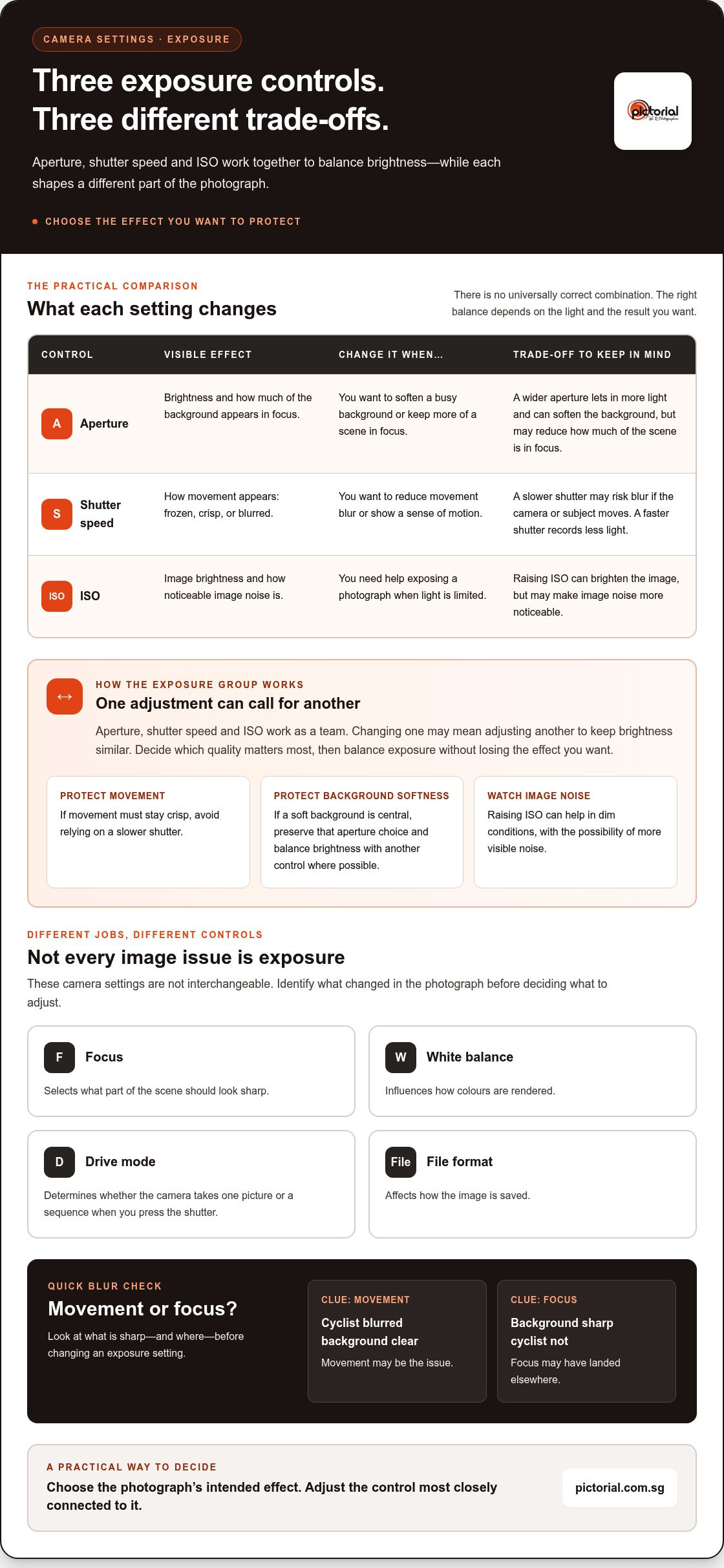
It also helps to distinguish movement blur from a focus mistake. Exposure controls affect how movement is recorded, while focus controls determine which part of the scene appears sharp. If the cyclist is blurred but the background is clear, movement may be the issue. If the background is sharp and the cyclist isn’t, focus may have landed elsewhere. Look for where the image differs from your intention, then use that clue to decide what to change.
A simple map of the main camera controls
Start with three controls that work together to shape exposure: aperture, shutter speed and ISO. You don’t need to master them all at once. Think of them as the main exposure group: they influence how the camera captures light and can affect the look of the photograph.
Other settings have different jobs. Focus helps select what should look sharp. White balance influences how colours are rendered. Drive mode determines whether the camera takes one picture or a sequence when you press the shutter. File format affects how the image is saved. These controls aren’t interchangeable: changing focus won’t solve every exposure problem, and changing white balance won’t correct missed focus.
The camera’s shooting mode is another way to choose how much control you want over exposure. Automatic modes make more decisions for you, while priority and manual modes let you take a more active role. This overview of digital camera modes offers a broader explanation of how those modes differ. Start with the level of control that feels comfortable, then build from there.
Understanding your camera settings becomes less daunting when you treat each control as a tool for a visible outcome. Decide what matters in the frame, then look for the setting most closely connected to it. That link between intention and adjustment is the foundation for learning the details that follow.
How Aperture, Shutter Speed, and ISO Work Together
Exposure is the overall brightness of a photograph, shaped by aperture, shutter speed and ISO. Each affects the image differently, so changing one may mean adjusting another to keep brightness similar. Think of them as a team, not three separate controls with fixed answers.
The exposure triangle describes how aperture, shutter speed and ISO work together to balance brightness while shaping a photograph. There isn’t one universally correct combination. The right balance depends on the available light and the effect you want.
Aperture, shutter speed, and ISO: the practical difference
Aperture is the opening in the lens. It affects how much light enters and how much of the background appears in focus. Shutter speed controls how long the camera records light, influencing whether movement looks frozen or blurred. ISO is the camera’s sensitivity setting. Raising it can brighten an image in low light, but may also make image noise more noticeable.
| Control | Visible effect | Common reason to change it |
|---|---|---|
| Aperture | Background depth and brightness | To soften a busy background or keep more of a scene in focus |
| Shutter speed | How movement appears | To reduce movement blur or show a sense of motion |
| ISO | Brightness and visible image noise | To help expose a photograph when light is limited |
In practice, each setting can solve one problem while bringing a creative trade-off. A wider aperture can brighten the image and soften the background, for example, while a higher ISO can help in dim conditions but make noise more visible.
Why changing one exposure setting affects the others
Imagine photographing a bowl of fruit beside a window on a cloudy afternoon. The first frame looks too dark, and you want to keep the background soft. Opening the aperture can let in more light, but it may also reduce how much of the scene appears in focus. If the image becomes too bright, you could use a faster shutter speed to reduce the light recorded, or lower ISO if it had been raised.
Each adjustment has a different cost. A slower shutter may risk blur if the camera or subject moves. Raising ISO can make noise more visible. Changing aperture affects background depth. Before adjusting, decide which quality matters most in this photograph. If movement must stay crisp, avoid relying on a slower shutter. If a soft background is central to the image, preserve that aperture choice and balance brightness with another control where possible.
That’s the useful habit behind understanding your camera settings: choose the effect you want to protect, then adjust another part of the exposure balance. To practise these choices with guidance, Pictorial’s hands-on photography courses let you work with camera controls in real shooting situations.
Which Camera Setting Should You Adjust for the Result You Want?
When a photo doesn’t look as you imagined, start with the visible problem instead of changing several controls at once. A background that feels too busy, motion that looks smeared or a dim image each points towards a different first adjustment. Matching the control to your goal makes understanding your camera settings more practical and helps you see what each change does.
For a softer background, start with aperture; to control how movement looks, start with shutter speed. Treat this as a first step, not a fixed rule. Exposure still depends on the other settings, and focus may be the real issue if the wrong part of the image looks sharp.
Match a creative intention to an exposure control
If you want a subject to stand apart from its background, consider aperture first. If you’re photographing a moving subject, look at shutter speed and decide whether to keep the action crisp or show a sense of movement. In a dim scene, ISO can help the camera record a brighter image, though higher ISO may make image noise more noticeable.
Use your intention as a guide: protect the effect that matters most, then balance exposure with the other controls. For instance, if you need a fast shutter to capture movement, raising ISO may be preferable to slowing the shutter, even with the possible noise trade-off.
Understand focus, metering, and white balance
Exposure isn’t the only reason a photo may look wrong. Focus determines which part of the scene appears sharp, so check the focus point if your subject is soft but other details are clear. Metering is the camera’s method of assessing scene brightness to help set exposure. White balance affects how the camera represents colour temperature, which can make a scene look warmer or cooler.
These controls solve different problems. An exposure adjustment won’t fix focus that landed on the background, and changing white balance won’t brighten a dark photograph in the same way as adjusting exposure.
Choose a camera mode without feeling locked in
Automatic mode lets the camera choose most exposure settings. Aperture-priority lets you choose aperture while the camera selects a shutter speed; shutter-priority lets you choose shutter speed while it selects an aperture. Manual mode gives you direct control over the exposure settings. Priority modes are a useful middle ground when one visual effect matters most.
Move between modes as the scene or your confidence changes. Start in automatic if you want fewer decisions, then try a priority mode when you want to shape background depth or motion. A beginner photography course can give you the chance to practise these choices with hands-on guidance. Whichever mode you use, check focus separately from exposure so you can identify why a frame looks soft or unexpectedly dark.
A Beginner’s Routine for Testing Camera Settings in the Field
Camera settings are easier to learn when you can connect a deliberate change to what appears in the frame. Instead of adjusting several controls and hoping for a better result, use the same simple practice loop each time. Keep your position and the light as consistent as you can while testing. That makes it easier to see what changed between frames.
A five-step practice loop for learning settings
- Choose the goal. Decide what you want the photograph to show, such as a sharp moving subject or a softly blurred background.
- Select a mode. Use a mode that lets you control the setting most connected to your goal. A priority mode can help you focus on one choice while the camera assists with others.
- Take a test frame. Photograph the same subject in the same light, and note the setting you chose.
- Inspect the result. Check whether the intended part of the image looks right. Review the display information and histogram if your camera provides them.
- Change one control and repeat. Adjust only the setting relevant to the issue, take another frame, and compare the two.
For example, if you’re photographing a stationary subject and want more of the scene to appear in focus, adjust aperture while keeping your framing and light steady. Take another frame and compare the background and overall brightness. If you also change ISO or shutter speed, it becomes harder to tell which adjustment caused the difference. Changing one thing at a time builds understanding your camera settings through direct observation.
How to learn from a result that looks wrong
First, identify what looks wrong rather than labelling the whole image a failure. A frame that looks too bright or dark has an exposure issue. Streaked detail may point to movement during the exposure; a sharp background with a soft subject may suggest focus missed its mark. A colour cast may call for a white balance adjustment instead.
Review the photograph and its displayed exposure information, then use the histogram as another clue. The histogram shows how tones are distributed from darker to brighter areas. If much of the graph is pushed against an edge, some tones may have lost detail, but the shape that suits an image depends on the scene. A dark scene can naturally have more information on the shadow side. Don’t judge exposure from screen brightness alone, since display brightness can affect how the image appears.
Keep a brief note of your goal, the setting you changed and what you noticed. Over time, these comparisons help you recognise patterns and choose adjustments with less guesswork. You can also improve photography skills through practice by applying the same deliberate approach during hands-on shooting.
Explore Pictorial’s hands-on photography courses
Build Confidence With Camera Settings Through Guided Practice
Camera controls become easier to understand when you can try a setting, see its effect and ask why the image changed. You don’t need to memorise every menu first. Deliberate practice with one clear goal at a time helps turn unfamiliar choices into useful habits, whether you’re photographing a still subject or following movement outdoors.
When guided practice can help
It can help to have guidance while you test a setting in real shooting conditions. You might take a frame, notice that the background looks different than expected, then adjust one control and compare the result. With personalised instruction, you can ask questions in the moment and connect the camera’s response to the choice you made.
Pictorial offers hands-on photography courses for beginners and advanced learners. Classes have a maximum of three participants, so you can get personalised guidance while practising with a camera. Bring your own camera or use a Complimentary camera loan (if needed). A beginner photography course can help you explore the fundamentals through guided practice.
Guidance is especially useful when two problems seem similar. A subject may look soft because focus landed elsewhere, or because movement blurred during the exposure. Instead of changing several settings, inspect the image, describe what you see and test the control most relevant to the issue. Understanding why an adjustment works makes it easier to repeat that decision on your own.
A calm next step for learning your camera
There’s no need to master every menu before you can make meaningful photographs. Start with a scene that interests you, choose one result to aim for and notice how the image responds. If a frame doesn’t work, it still gives you information you can use to decide what to try next.
Keep the routine simple: take a photograph, review it, then change one setting if the result needs adjustment. Over time, this steady process can make camera decisions feel less like guesswork. You’ll also become more comfortable choosing when to rely on automatic assistance and when to take greater control. For readers who want more support navigating modern technology and devices, the Achieve With Nate Movement offers practical guidance on developing digital confidence.
If you’d like a structured way to practise, explore Pictorial’s photography courses. Hands-on instruction can help you work through camera choices with guidance, then carry those observations into your own photography.
Take Your Next Photograph With More Intention
Your next step doesn’t need to be a complicated project. Choose a familiar subject and give yourself one simple aim, such as making its details stand out or capturing its movement clearly. That personal goal gives understanding your camera settings a practical purpose: you’re making choices to express what you noticed, not just turning dials for their own sake.
As you grow more comfortable, your photographs can become a record of your decisions. Notice what draws your eye, try a different approach on another outing, and let curiosity guide what you learn next. Progress comes from returning to the camera with patience, not from getting every frame right on the first try.
Pictorial’s hands-on photography courses offer a structured way to keep learning with guidance.
Keep noticing, keep trying, and trust yourself to learn one photograph at a time.
Frequently Asked Questions
What are the most important settings on a camera?
For exposure, start with aperture, shutter speed and ISO, then learn focus and white balance. Which matters most depends on the photograph: a child running across a playground calls for different choices from a still bowl of fruit. A useful beginner approach is to choose one result you want, such as keeping a moving subject clear, and learn the setting most closely connected to it before exploring the rest.
Is ISO the same as shutter speed?
No. ISO and shutter speed are separate exposure controls. Shutter speed sets how long the camera records light, so it influences how movement appears. ISO is a sensitivity setting that affects brightness and how noticeable image noise may be. If a scene is dim, raising ISO may help you keep a faster shutter speed, but the resulting image may show more grain-like noise.
Can I take good photos without using manual mode?
Yes. Automatic and priority modes can produce strong photographs, and using them doesn’t prevent you from learning. If you want more influence without setting everything yourself, aperture-priority or shutter-priority lets you choose one key exposure value while the camera handles others. The useful question is whether the mode gives you enough control for the scene, not whether you’re using the most advanced option.
What does the histogram show on a camera?
A histogram is a graph showing how tones in a photograph are distributed from dark to bright. A graph gathered toward the left contains more shadow tones, while one toward the right contains more highlights. It can help you spot a possible loss of detail at either end, especially in bright conditions when the rear display is hard to judge. Read it alongside the image, since a naturally dark scene can have a left-heavy graph.
Should a beginner shoot in RAW or JPEG?
JPEG is convenient if you want ready-to-share files and prefer not to spend time processing images. RAW files preserve more image data for later adjustments, but usually need compatible software and take more storage space. If you’re learning composition and exposure, JPEG can keep your workflow simple. You can also try RAW plus JPEG if your camera supports both, then compare the files and decide which suits your habits.
Why do camera settings have different names on different cameras?
Manufacturers use different labels, symbols and menu layouts for similar functions, and some controls have more than one abbreviation. Aperture-priority, for example, may appear as “A” or “Av,” while shutter-priority may appear as “S” or “Tv.” Check your camera’s manual or on-screen help when a label is unfamiliar. Once you recognise the function, the control is easier to understand even if its name changes.
How do I reset my camera settings to their defaults?
Look in your camera’s setup or settings menu for an option such as “Reset,” “Clear settings” or “Factory reset.” The wording and reset scope vary by camera, so consult the manual before confirming. Some models offer separate resets for shooting settings and custom functions. Check which settings will be cleared, and save any personal setup details you want to restore. Don’t assume every reset option affects the same menus.

Disclaimer
© Pictorial | All Rights Reserved.