
How to Master Mobile photography for Better Results
A mobile photography workshop in Singapore can be a focused 7-hour class, while a broader course overview may run for 10 weeks. The right duration depends on whether you want a practical introduction or a longer learning programme. Comparing the course format matters as much as comparing the number of hours.
If you’re unsure what a workshop actually involves, that’s understandable. Course listings can make it difficult to tell how much time is spent practising, what funding may apply, or whether attendance leads to a certificate.
This guide explains what to consider when comparing course fees, duration and funding eligibility in Singapore. It also covers practical lessons, attendance requirements and certification, so you can understand what to expect before choosing a course.
Use these points to assess whether the teaching format suits you, from guided outdoor practice to the skills covered in class. A clear starting point can help you build confidence using your phone’s camera.
Key Takeaways
- Compare course duration and format so you can choose between a focused workshop and a longer learning programme.
- Learn how funding eligibility and available credits can affect the amount you pay for an eligible course.
- Practise steady framing, thoughtful composition and working with available light to make stronger phone photos and videos.
- Look for hands-on lessons that let you practise in real settings and apply techniques with guidance.
- Understand the attendance and assessment requirements before enrolling, and choose a photography course that matches your experience and goals.
Course duration, fees and funding eligibility
Singapore courses range from focused workshops to longer programmes. Compare the teaching format, fee, funding eligibility and practical activities before choosing a course.
Course Duration and Venue
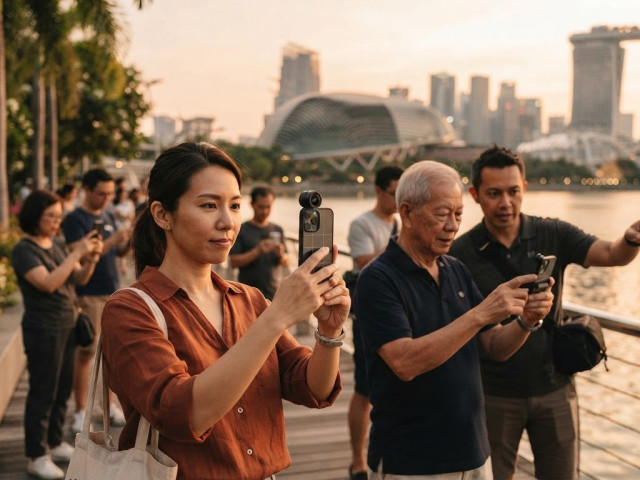
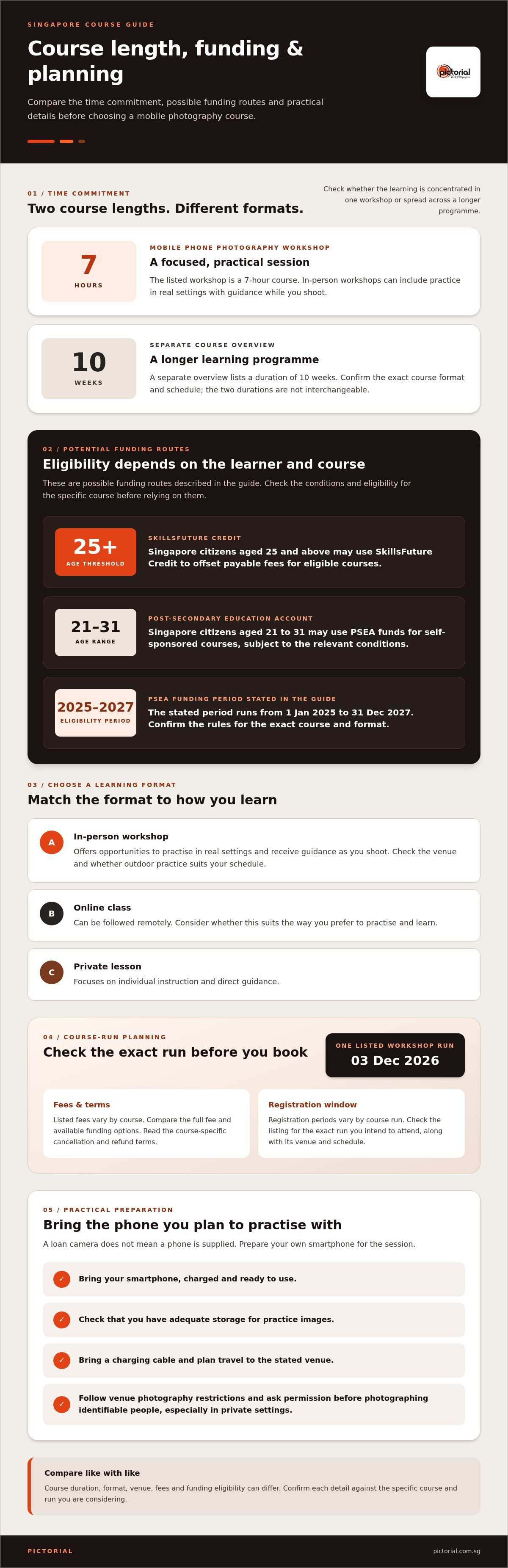
A mobile phone photography workshop in Singapore is listed as a 7-hour course. A separate course overview lists a duration of 10 weeks, so check whether learning happens in one workshop or across a longer programme. The venue can affect travel planning and whether outdoor practice is convenient. Compare the class format and location details with your schedule before registering.
In-person workshops provide opportunities to practise in real settings and receive guidance as you shoot. Online classes can be followed remotely, while private lessons focus on individual instruction. Choose based on how you learn best: practising with a group, working at your own pace online, or receiving direct guidance. These formats offer different ways to build photography skills.
Fees and SkillsFuture Subsidies
Listed fees vary by course. Compare each course’s full fee and funding options rather than treating these figures as interchangeable.
Singapore citizens aged 25 and above may use SkillsFuture Credit to offset payable course fees. Singapore citizens aged 21 to 31 may use Post-Secondary Education Account funds for self-sponsored courses. That funding eligibility period runs from 1 Jan 2025 to 31 Dec 2027.
Before booking, read the conditions for the specific course and format. Check the stated cancellation and refund terms so you understand the booking policy.
Course Dates and Registration
One listed workshop run is on 03 Dec 2026. Registration windows vary by course run, so check the listing for the run you plan to attend. Use the registration period to plan when to enrol, then leave time to prepare your phone and schedule travel to the stated venue. Dates and enrolment windows are course-specific, so match the details to the exact run you intend to attend.
At workshop locations, follow venue instructions and respect any restrictions on photography. If photographing identifiable people, ask permission, especially in private settings. Bring the smartphone you plan to practise with, since a loan camera does not mean a phone is supplied. A charged phone, adequate storage and a charging cable help you capture practice images and take notes during the session.
Smartphone photography and videography techniques
Small choices affect smartphone photos: where you stand, how you hold the phone and when you tap the shutter. Change one thing at a time, then compare the images. This helps you understand your camera’s controls without relying on jargon or editing.
Start with the lens. Wipe it with a clean, soft cloth, since fingerprints can soften details and create glare around bright lights. Open the camera app and tap your subject to focus. If your phone has exposure adjustment, lower it slightly when a bright window washes out a face. Check the preview before shooting.
- Choose a lens deliberately: use the standard view for everyday scenes, then try a wider view for architecture or a tight room.
- Move closer: take a step towards a flower or dish rather than enlarging it digitally.
- Keep the phone steady: hold it with both hands and brace your elbows against your body.
- Use the grid: align a horizon with a grid line to avoid a tilted skyline.
Lighting changes how a phone records colour and detail. Near a window, turn your subject towards soft daylight and watch for hard shadows across the face. Outdoors in Singapore, look for open shade when direct sun creates sharp highlights. For a food photo, shift the plate until light falls across its texture, then tap to focus on the nearest detail.
Phone features vary, so learn the controls on your own device. Portrait mode can separate a subject from the background, while night mode may help in dim scenes. Try each setting on the same subject and compare the images at full size. Avoid digital zoom when moving closer gives a clearer result. If you edit a copy later, keep the original image.
For video, choose a clear subject and decide whether you need a fixed frame or gentle movement. Hold the phone horizontally for a broad scene or vertically for someone speaking to viewers. Start recording before the action, keep both hands steady and let the clip run briefly after it ends. This gives the footage cleaner openings and endings.
Sound matters, too. Move away from a fan or busy road before recording speech, and point the phone’s microphone towards the speaker. Record a short test clip and listen for wind, handling noise and clear speech before filming the full scene. These steps help you control both images and video.
Composition, lighting and framing
Composition guides the viewer’s eye through a photograph. In smartphone photography, shifting your position can make a familiar Singapore scene feel more deliberate.
Composition Rules
The Rule of Thirds helps position a subject away from the centre. Turn on your camera grid and place a person near an intersection. For a skyline, align the horizon with a horizontal guide. The Golden Ratio offers another way to arrange visual weight, using a gentle spiral that leads towards the subject. Treat both as starting points, not strict rules.
Look for lines that lead the viewer’s eye. A path can draw attention towards a person or tree. Keep background details from competing with your subject. Before taking the photo, scan the frame edges for signs, branches or bright objects that distract from the main idea.
Try a centred frame when symmetry strengthens the image. A corridor or building entrance can feel balanced when its sides mirror each other. For a less formal result, place the subject off-centre and leave open space in the direction they face. Each choice changes the mood and how the viewer moves through the image.
Lighting, Distance and Angles
Light shapes texture, colour and contrast. Near a window, turn a face towards soft daylight, then compare it with the light falling from behind. Outdoors in Singapore, open shade can soften harsh midday highlights. Watch how the direction of light changes the subject before adjusting the frame or camera settings.
Your distance from a subject affects how much of the scene appears and how close objects feel. Step closer to isolate a detail, such as a cup, or move back to include its surroundings. Avoid digital zoom when you can safely reposition. A low angle can make a building feel imposing, while eye level often suits a conversation or portrait.
Framing also depends on what you leave out. For a hawker-centre meal, move clutter away from the plate or change your angle to hide it. Keep vertical lines upright when photographing tall buildings. If the frame feels crowded, take a step back, then decide whether the extra space supports the subject or weakens its presence.
Practise with one subject and try several compositions. Photograph a bicycle at eye level, then from above, and compare how each view changes its shape. Try the grid, then switch it off and trust your eye. Comparing the frames helps you see which choices work and which details pull attention away.
Composition rules work best when they serve the subject. A centred portrait, a spiral-led arrangement or a close crop can each work for different reasons. Review the image before moving on. Ask what the viewer notices first, then adjust distance, angle or light to make that clearer.
Classroom and field-trip learning
A classroom gives learners room to examine a technique before applying it outdoors. One Singapore workshop listing describes classroom-facilitated learning alongside outdoor photography and an assessment. This structure connects instruction with practical work, so you can try a technique in a real scene and review how it affected the result.
Classroom learning can help you break a photograph into clear decisions. Identify the subject, notice the available light, then decide what belongs in the frame. For example, use a sheltered walkway as a setting: choose a person or object as your subject and consider how the background supports it.
Outdoor practice makes changes in light easier to observe. Photograph the same subject in open shade and beside a brighter area, then compare how the light changes its appearance. Shift your position to see how nearby lines or textures affect the frame. These comparisons develop observation as well as camera handling.
A practical session lets you review an image while the scene is still there. Check whether the subject is in focus and whether the background distracts. If a face looks too dark against a bright setting, change your position or angle and take another frame. Comparing the images shows the effect of the adjustment.
One course listing includes four modules and a hands-on practical session. It also lists an assessment, giving learners a chance to apply course concepts to their work. Treat the assessment as an opportunity to show your choices, such as how you framed a subject or responded to available light.
For photographs intended for social media, make the main subject clear before considering any editing. A close view of a dish, for example, may communicate more clearly than a crowded table scene. Review the original image and consider how framing, focus or lighting shaped the result.
Bring the smartphone you plan to use and make room for practice images. During an outdoor exercise, photograph one subject from different positions, then compare the frames. Note what changed, such as the background or direction of light. These observations give you something specific to discuss as you learn.
After a session, revisit a few images and describe the decision behind each frame. A note such as “moved closer to simplify the background” turns a photograph into a practical reference. Reviewing examples later can help you approach new scenes more deliberately.
Attendance and certification
Before enrolling, distinguish attendance, assessment and certification. A workshop listing records that 289 people have attended, but that figure describes participation, not a certificate or a specific attendance threshold. Course completion requirements depend on the individual course’s stated conditions, so read its attendance and assessment details as separate points.
Attendance matters when a course includes guided practice or assessment. Missing a practical activity can mean losing the chance to demonstrate a technique, such as framing a moving subject or balancing exposure outdoors. Plan your journey, note the start time and allow time to settle before instruction begins.
For a course with an assessment, check what is evaluated and how it relates to the lessons. A mobile photography assessment may involve applying composition, focus or lighting techniques. Treat it as a chance to show how you make decisions, not simply whether you capture a striking moment.
Certification is separate from assessment. An assessment alone does not mean a course awards a certificate. Check the course information for the credential and completion requirements. If a certificate matters for your work or records, make it part of your decision rather than assuming every workshop provides one.
Funding and attendance can also intersect. For a funded, self-sponsored course, confirm the listed eligibility and participation conditions before registering. Singapore citizens aged 21 to 31 may use Post-Secondary Education Account funds for self-sponsored courses, while eligible funding routes vary by course. Keep your registration details and any course communications together, so dates and requirements are easy to find.
Prepare for a practical session by charging your phone and freeing storage space. Bring a way to record notes, such as a notebook or phone memo, and capture examples during exercises when the instructor permits it. After each exercise, choose one image to review. Note what you would change to enhance focus, light or framing next time.
If your employer is sponsoring your learning, clarify internal approval and attendance expectations before committing. A scheduled class can conflict with work duties, and a missed session may affect your ability to complete course activities. Add the course date to your calendar and plan any work handover early.
Keep selected images alongside brief notes about the setting and the choices you made. This creates a practical reference for future assignments, personal projects or social media posts, and helps you notice how your approach to everyday scenes develops.
View photography course registration
Pictorial: Photography Starter Session
Pictorial’s Photography Starter Session offers guided practice with photography basics. Groups are limited to three participants, allowing room for personal guidance during practical outdoor shooting. Bring your own camera or use the complimentary camera loan.
If you’re focused specifically on phone photography, Pictorial also offers Mobile Photography Essentials. Choose the learning path that best matches the equipment you want to use and the skills you hope to develop. Both options give you a structured way to practise rather than relying on trial and error alone.
Explore the mobile photography course at your own pace.
Make Your Next Photo More Intentional
Start with one scene and make several versions by changing your framing, distance or angle. Compare the results, notice what draws your eye and carry that choice into your next photograph. This simple habit turns ideas from a mobile photography workshop in Singapore into practice you can continue on your own.
Pictorial offers the Photography Starter Session, Mobile Photography Essentials and Intermediate Photography Course. Each provides a different starting point, from photography fundamentals to phone-focused learning and more advanced skills. Choose the direction that fits the photographs you want to make.
Keep looking closely, practise with intention and let each frame teach you something new.
Frequently Asked Questions
Need more course info?
For a clear starting point, compare the course’s equipment focus, teaching format and completion details. Pictorial’s Mobile Photography Essentials centres on using a phone, while the Photography Starter Session introduces wider photography fundamentals. If you want to build a learning plan, decide whether you’re practising for personal projects, travel photos or everyday moments, then choose the course that best matches that goal.
What skills will you gain?
You’ll practise making deliberate choices before taking a photograph. For a family portrait, decide what should stand out, then adjust your position to simplify the background. You’ll also explore camera controls and exposure concepts to understand why an image looks bright, dark or soft, instead of relying on trial and error.
What will you learn?
You’ll learn to observe a scene and make practical decisions about the photograph you want. Try photographing a cup beside a window: notice the direction of the light, choose a clear background, then check focus before taking the picture. This step-by-step practice helps you understand each choice and apply it to other subjects.
What mobile photography workshops are available in Singapore?
A mobile photography workshop in Singapore suits learners who want to practise with a phone rather than focus on a separate camera. Pictorial’s Mobile Photography Essentials is designed for phone photography. The Photography Starter Session offers a broader introduction. Compare each course with the subjects you hope to photograph, such as food, family moments or travel scenes.
Which workshops are beginner-friendly?
Beginners can choose Mobile Photography Essentials for phone photography or the Photography Starter Session for a broader introduction. Pictorial’s group classes are limited to three participants, allowing for close guidance during practice. Consider the equipment you plan to use and whether you want a phone-specific course or wider camera fundamentals.
What topics and skills do phone photography courses cover?
A mobile photography workshop in Singapore can help you practise focus, exposure, framing and using available light. Photograph a dish near a window, then shift your viewpoint to reduce distracting background details. Compare the frames and decide which communicates the subject clearly. Pictorial focuses on photographic technique and understanding, with its “Pure Photography, No Editing” approach.
How much do these courses cost?
Course fees vary according to the specific course and whether you choose group or private instruction. Compare the course’s session structure and included learning activities alongside its fee, rather than judging by duration alone. Pictorial publishes its fees for each course. Reviewing the relevant course information helps you understand the applicable tuition before selecting a format that suits your learning needs.
What are the dates, durations and locations of upcoming workshops?
Mobile Photography Essentials is structured as two sessions, each lasting two hours. Group classes are scheduled Monday to Sunday, with listed daytime time slots; private sessions have their own scheduling window. Course dates and venues can vary by offering, so review the registration details for the specific course you’re considering. This helps you plan your travel and keep the session time free.

Disclaimer
© Pictorial | All Rights Reserved.