
Manual Mode Photography: Balance Aperture and Shutter Speed
Bright light doesn’t automatically make a photo brighter, and a dark image isn’t a mystery. In manual mode, aperture, shutter speed and ISO work together to control exposure. If an image looks too dark or bright, adjust one or more settings, using the exposure meter as a guide. This manual mode photography guide explains how to balance aperture and shutter speed while keeping control of the image’s look.
It’s easy to worry that one wrong setting will spoil a shot, especially outdoors, where strong light can wash out the sky or leave a subject looking too dark. Each control has a distinct effect: aperture changes the amount of light entering the lens and the depth of field, while shutter speed affects exposure and how movement appears.
Learn how these settings work together, why bright scenes can still be underexposed or overexposed, and what to consider when choosing a balance. Practical outdoor examples will help you make deliberate adjustments instead of guessing.
Key Takeaways
- Use a wider aperture for a softer background, or a smaller aperture when you want more of the scene in focus.
- In manual mode, set your preferred aperture and ISO, then adjust shutter speed while watching the exposure meter.
- Raise ISO when light is limited, but remember that higher settings can make image noise more visible.
- Choose shutter speed with movement in mind: faster settings help freeze action, while slower ones can create motion blur.
- In bright outdoor light, start with a low ISO and adjust exposure to protect bright skies and highlights.
Aperture and depth of field
Aperture controls how much light passes through the lens and how much of a scene appears in focus. In a manual mode photography guide, it’s one part of the three-setting exposure balance, alongside shutter speed and ISO.
Aperture’s Effect on Light and Depth
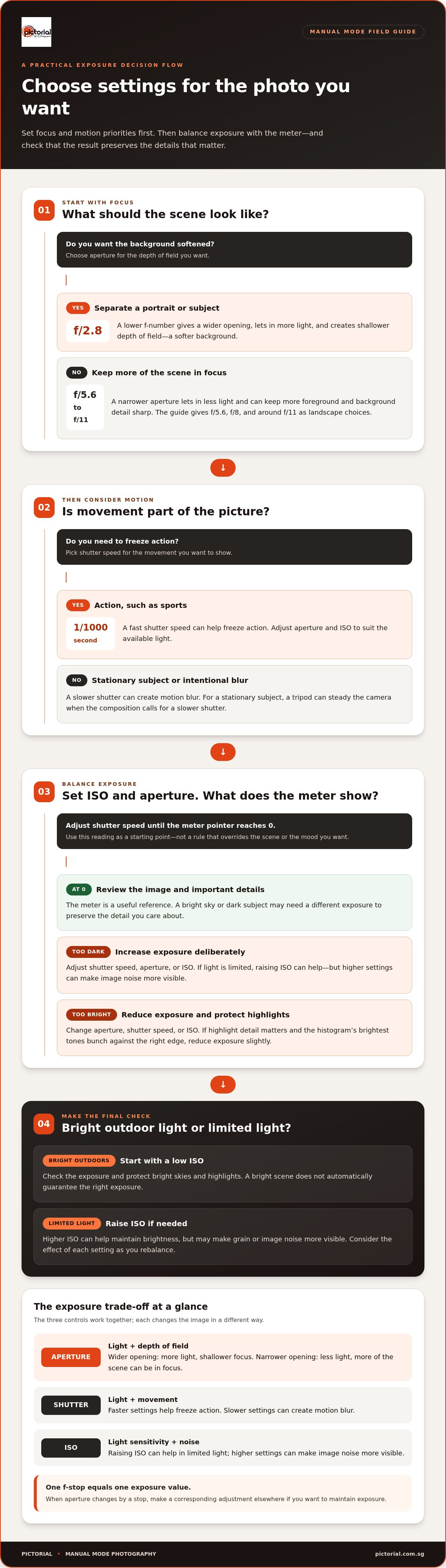
Aperture is the adjustable opening inside a lens, described by an f-number such as f/2.8 or f/11. A wider opening, represented by a lower f-number, lets in more light and creates shallower depth of field. A narrower opening lets in less light and can keep more of the scene in focus.
For a portrait, f/2.8 can separate the subject from a softened background. For a landscape, f/5.6 or f/11 can keep more foreground and background detail sharp. Choose based on the subject and the focus you want, then balance exposure with shutter speed and ISO.
Aperture in the Exposure Triangle
The exposure triangle describes how aperture, shutter speed and ISO work together to control exposure. Aperture affects light and depth of field; shutter speed affects light and movement; ISO affects how the camera records available light, with higher settings potentially adding visible grain.
If you close the aperture to keep more of a landscape sharp, less light reaches the sensor. A slower shutter or higher ISO can compensate, but each changes the image differently. One f-stop equals one exposure value, so changing aperture by a stop calls for a corresponding adjustment elsewhere.
Choosing a Camera Mode
Aperture Priority lets you choose the f-number while the camera selects a shutter speed based on its exposure reading. It suits situations where background blur or sharpness across the scene matters most. Shutter Priority reverses that choice: you set the shutter speed, and the camera selects the aperture.
Manual mode gives you direct control over aperture, shutter speed and ISO. For example, set the ISO and aperture first, then adjust shutter speed until the exposure-meter pointer reaches 0. That reading is a useful starting point, not a rule that overrides the brightness or mood you want.
Practical Aperture Choices
Start with the subject’s focus needs. A lower f-stop can help blur a portrait background, while f/5.6 or around f/11 can suit landscapes where deeper focus matters. A flower photographed at f/2.8 can have a soft background; an image made around f/11 can show more detail from front to back.
After choosing an aperture, check whether the shutter speed still suits the scene. If it’s too slow for handheld shooting, raise ISO or open the aperture. A tripod can steady the camera for a stationary subject, allowing a slower shutter when the composition calls for one.
What is Manual mode in photography?
Manual mode lets you choose the camera’s exposure settings instead of relying on automatic settings. You decide how to balance brightness, detail and movement in each situation.
Balancing the Exposure Triangle
The exposure triangle is the relationship between aperture, shutter speed and ISO, which together shape exposure. Understanding their effects helps you adjust one setting without losing sight of the others.
In manual mode, choose an aperture for depth of field and a shutter speed for the movement you want to capture. Then set ISO to suit the available light. If you close the aperture, less light reaches the sensor, so you may need a slower shutter or higher ISO to maintain brightness.
Every adjustment has a trade-off. A slower shutter can create motion blur, while a higher ISO can add grain. To darken an image, shorten the exposure by changing shutter speed or aperture, or lower ISO. Keep the effect you want in mind as you balance the settings.
Setting Exposure with the Meter
The exposure meter indicates whether the camera expects your settings to produce a brighter or darker exposure. Use it as a helpful starting point when choosing manual settings.
Set your ISO and aperture first, then adjust shutter speed until the meter’s pointer reaches 0. This is the approach shown in a manual-mode example. Treat the reading as a reference: a bright sky or a dark subject may need a different exposure to preserve the detail you care about.
For portraits, f/2.8 can soften the background; landscapes often benefit from f/5.6 or f/8 to f/11. For sports, a shutter speed such as 1/1000 second can help freeze action, with aperture and ISO adjusted for the light.
Assessing Exposure with the Histogram
A histogram is a graph of an image’s tonal values, from shadows on the left to highlights on the right. It helps you assess exposure beyond the meter’s single reading.
Review the graph alongside the image preview. If highlight detail is important and the brightest tones bunch against the right edge, reduce exposure slightly; the guide recommends exposing slightly under to avoid blown-out skies. In manual mode, make that correction with aperture, shutter speed or ISO. Exposure compensation can guide your adjustment, but in manual mode it usually doesn’t change exposure settings unless Auto ISO is active. The -1 EV example applies to Aperture Priority, where the camera can increase shutter speed.
Manual Settings for Different Scenes
Portraits, landscapes and sports call for different combinations because focus, depth of field and movement vary. For portraits, use a lower f-stop and focus on the subject; for landscapes, choose a smaller aperture for greater depth of field. For sports, prioritise a fast shutter and use continuous autofocus with burst mode to track movement.
Use autofocus for moving subjects or when you need quick, reliable focus; choose manual focus when you want precise control over a stationary subject. On Canon, Nikon, Sony and Fujifilm cameras, select M on the mode dial, then adjust aperture, shutter speed and ISO with the camera’s controls. Button and dial layouts vary by model, but the exposure principles are the same.
Common mistakes include choosing a shutter too slow for moving subjects, raising ISO without considering grain, and trusting the meter without checking highlights. Review the histogram and image preview after a test frame; ISO 3200 in a dark setting can introduce visible noise. If you want guided practice with exposure settings, Pictorial’s Basic Photography Course covers camera fundamentals.
What is Exposure Compensation?
Exposure compensation tells an automatic exposure mode to make its reading lighter or darker. In manual mode, pay close attention to ISO: raising it can brighten an image, but may also make image noise more visible. Understanding this trade-off helps beginners choose settings deliberately instead of treating ISO as a simple brightness control.
ISO Sensitivity and Image Noise
ISO describes how sensitive the camera’s sensor is to light. Many modern cameras have a common range from ISO 100 to 6400, though the usable range varies by camera. A lower ISO usually keeps fine detail cleaner, while a higher setting can help when light is limited and a faster shutter is needed.
For example, ISO 100 is a useful starting point in bright conditions. In a dark setting, ISO 3200 can introduce visible noise, and an ISO 6400 image may show noticeable grain. These are examples, not fixed limits: the camera, scene, exposure and intended image size all affect how noise appears.
How ISO Affects Image Grain
Grain often stands out in smooth areas, such as a clear sky or a shadowed wall. Photograph the same scene at different ISO settings, then compare the frames on your camera’s display, especially the shadow detail. This quick test shows how much noise your camera produces and whether a higher ISO suits that photograph.
When shooting in manual mode, first decide whether aperture or shutter speed needs to stay fixed for the effect you want. If the image is too dark, raising ISO can brighten it without changing depth of field or motion blur. Expose carefully, though: brightening a very dark image later can make noise more apparent.
RAW and JPEG Image Formats
RAW and JPEG are two formats cameras use to save images. A RAW file retains more sensor information for later adjustments, while a JPEG is processed in-camera and compressed into a ready-to-view image. This matters if you plan to adjust exposure, colour or shadow detail after shooting.
RAW files need compatible software to render and export them in a viewable format, such as JPEG. Conversion settings affect the finished image, so keep the original RAW file if you may want to edit it again. JPEG is convenient for sharing, but its in-camera processing leaves less room for substantial exposure changes.
Using Exposure Compensation
Exposure compensation is most direct in automatic modes, where it shifts the camera’s exposure choice. In Aperture Priority, setting compensation to -1 EV makes the image darker by prompting a faster shutter speed. In full manual mode, adjust shutter speed, aperture or ISO yourself; compensation may guide exposure only when Auto ISO is active.
For a practical workflow, take a test frame, inspect the highlights and shadows, then change one setting at a time. Keep ISO low when the light allows, but raise it when a faster shutter helps preserve moving detail. Balance the settings according to the scene and the result you want.
Shutter speed and motion
Shutter speed controls how long light reaches the sensor and how movement appears in an image. Choose it according to the subject’s motion, then balance exposure with aperture and ISO.
Choosing Shutter Speed for Moving Subjects
A fast shutter captures a brief moment, while a slower shutter records movement across more time. For example, 1/1000 second can freeze action, and 1/4000 second can capture an athlete moving quickly. Joggers can often be photographed around 1/250s to 1/500s, while small birds in flight may need 1/1600s or faster.
Start with the motion you want to show. If a runner looks blurred, choose a faster shutter and adjust aperture or ISO to maintain exposure. For creative motion blur, try a slower setting such as 1/30s, ideally with a tripod for a stationary camera. The moving subject then becomes the visible blur.
Handheld Shutter Speed and Camera Shake
Camera shake happens when movement from your hands shifts the camera during an exposure. A faster shutter can reduce that blur, especially with a longer focal length. One practical guide is to match the minimum handheld shutter speed to the lens’s focal length: use at least 1/50 second with a 50mm lens, or 1/200 second with a 200mm lens.
At around 1/100s and slower, watch closely for shake, especially when handholding. Stabilise your stance, hold the camera firmly, and take a test frame. If the subject is still and the shutter must be slower, a tripod can keep the camera steady. It won’t freeze a moving subject, so motion can still blur.
Shutter Priority is useful when movement matters most: set the shutter speed, and the camera selects an aperture based on its exposure reading. Program mode lets the camera choose a shutter and aperture combination, which can help when you need to respond quickly instead of setting both yourself. In either mode, review the image and adjust ISO if more light is needed.
In manual mode, you choose the shutter speed, then balance aperture and ISO. A fast shutter reduces motion blur but allows less light into the camera. If the image becomes too dark, open the aperture or raise ISO. If a bright scene makes the exposure too bright, use a faster shutter or adjust another setting.
For a useful field test, photograph the same moving subject at 1/25 seconds and 1/100 seconds. Compare how much motion each frame records, then repeat with a faster setting if the subject remains blurred. This simple comparison shows how shutter speed changes the image, while the exposure triangle helps you compensate for the light lost or gained.
Outdoor photography in bright light
Bright sunlight can still produce an underexposed or overexposed photograph. The camera records the light reaching its sensor, so your chosen aperture, shutter speed and ISO determine the result. A useful starting point for sunny conditions is ISO 100. From there, choose settings that preserve important highlights while keeping your subject correctly exposed.
The Sunny 16 rule offers a reference for direct sun: set ISO 100, aperture f/16 and shutter speed 1/100 second. Treat this as a starting exposure, then review the image and adjust for the subject. A dark subject against a bright sky may need a different balance than a sunlit building filling the frame.
Overexposure occurs when too much light reaches the sensor, washing out bright areas such as clouds or pale surfaces. Underexposure occurs when too little light is recorded, leaving the subject dark. In manual mode, a very wide aperture or slow shutter can overexpose a sunny scene. A faster shutter, smaller aperture or lower ISO can reduce exposure.
For a sunny-day example, the guide uses ISO 100, f/5.6 and around 1/500 second, with white balance set to 5260. That combination illustrates how a faster shutter can balance a wider aperture in strong light. If your subject looks blurry, check whether the shutter is slow for its movement. If the background is too bright, reduce exposure and inspect the highlights again.
Keep ISO low when sunlight gives you enough exposure flexibility. ISO 100 is a practical starting setting in bright conditions; raising it can make the image brighter, but may add grain. When you want a shallow depth of field outdoors, a wide aperture such as f/2.8 may admit too much light. Pair it with a faster shutter, such as 1/500 second, and review the result.
Bright skies can lose detail before a subject looks obviously overexposed. Take a test frame, then check the image preview and histogram. If the brightest tones crowd the histogram’s right edge, reduce exposure slightly to help preserve sky detail. Then check the subject: reducing exposure too much can make faces or shaded details too dark. The right balance depends on what the photograph needs to show.
In changing outdoor light, adjust one setting at a time. Keep aperture fixed if background blur matters, then use shutter speed to control brightness and movement. If the shutter becomes too fast or slow for the scene, adjust ISO. A deliberate test frame makes the effect of each setting clearer than changing several controls at once.
Practise photography skills outdoors
Pictorial: Photography Starter Session
Pictorial’s Photography Starter Session gives beginners a practical way to work through camera settings with guidance. If aperture, shutter speed and ISO still feel disconnected after reading, hands-on outdoor shooting can help you see how each adjustment changes a photograph.
Classes are small, with a maximum of three participants, and include practical outdoor guidance. Bring your own camera or use a complimentary loaner camera provided by the school. Practise adjusting exposure settings, review the results in each frame, and ask questions as you build confidence with manual mode.
Ready to practise these fundamentals with guidance? Visit pictorial.com.sg.
Make Your Next Frame a Practice Frame
Progress comes from making a choice, seeing its effect and adjusting with purpose. Before your next outing, choose a creative aim: keep a portrait’s background soft, hold detail across a landscape or show movement clearly. That intention gives each setting a job and makes reviewing your images more useful.
Use this manual mode photography guide as a reference while you practise, not as a test to pass. Keep a few frames from the same scene and notice which choices helped express what you saw. With practice, changing settings feels less like solving a puzzle and more like shaping a photograph.
For structured guidance, Pictorial offers the Photography Starter Session and Intermediate Photography Course. Mobile photographers can explore Mobile Photography Essentials. Choose the course that matches how you want to practise, then keep making photographs at your own pace.
Every deliberate frame builds on the last. Keep observing and experimenting, and let your eye guide the next adjustment.
Frequently Asked Questions
What does the camera do to make the image underexposed (darker) or overexposed (brighter)?
In manual mode, the camera records the exposure produced by your selected settings. To darken a bright scene, try a faster shutter speed, a narrower aperture or lower ISO. To brighten a dim subject, use a slower shutter, a wider aperture or higher ISO. Change one control, then review the image to see the effect.
What do ISO, shutter speed and aperture control in manual photography?
Aperture controls the light entering the lens and the depth of field. Shutter speed controls how long light reaches the sensor, affecting brightness and visible movement. ISO affects how the camera records available light, with higher settings potentially showing more grain. For example, choose an aperture for the background blur you want, select a shutter speed for the subject’s movement, then adjust ISO to balance exposure.
How does the exposure triangle work in manual mode?
The exposure triangle describes how aperture, shutter speed and ISO combine to create an exposure. Changing one setting affects brightness, but the others can compensate. For example, to keep more of a scene in focus, choose a narrower aperture and use a slower shutter or higher ISO to brighten the image. Each choice also affects movement, depth of field or visible grain.
How to set exposure in manual mode using a camera’s light meter?
Set ISO and aperture for the scene, then adjust shutter speed while watching the camera’s meter. In a common example, the pointer reaches 0 when the camera reads the settings as balanced. Take a test frame and inspect the subject, since a bright background can influence the meter’s reading. If the subject looks too dark, adjust exposure and review another frame.
How do shutter speed and focal length affect camera shake?
A longer focal length makes camera movement more apparent, so handheld shutter speed often needs to increase with focal length. A practical guide is at least 1/50 second with a 50mm lens and 1/200 second with a 200mm lens. If your image still looks shaky, steady your grip or use a tripod for a stationary subject. A tripod won’t freeze movement within the scene.
What is the exposure meter scale and how do you read it?
The exposure meter scale shows whether your selected settings are expected to produce a darker or brighter exposure than the camera’s reference reading. Its centre mark is usually 0, with positive and negative values on either side. A pointer toward the negative side signals an underexposure reading; toward the positive side signals overexposure. Use the scale as a guide, then review the image and highlights.
Does Singapore’s bright sunlight or tropical night lighting affect manual camera settings?
Yes. In bright Singapore sunlight, start with ISO 100 and adjust shutter speed or aperture to control exposure; the Sunny 16 example uses f/16 and 1/100 second. At night, artificial lights create bright spots against darker surroundings, so expose for the subject you want visible. For dark, gloomy conditions, a starting point of ISO 800 or ISO 1600 can help, though higher ISO may add grain.

Disclaimer
© Pictorial | All Rights Reserved.