
How to Master Manual Mode Camera Settings for Better Exposure
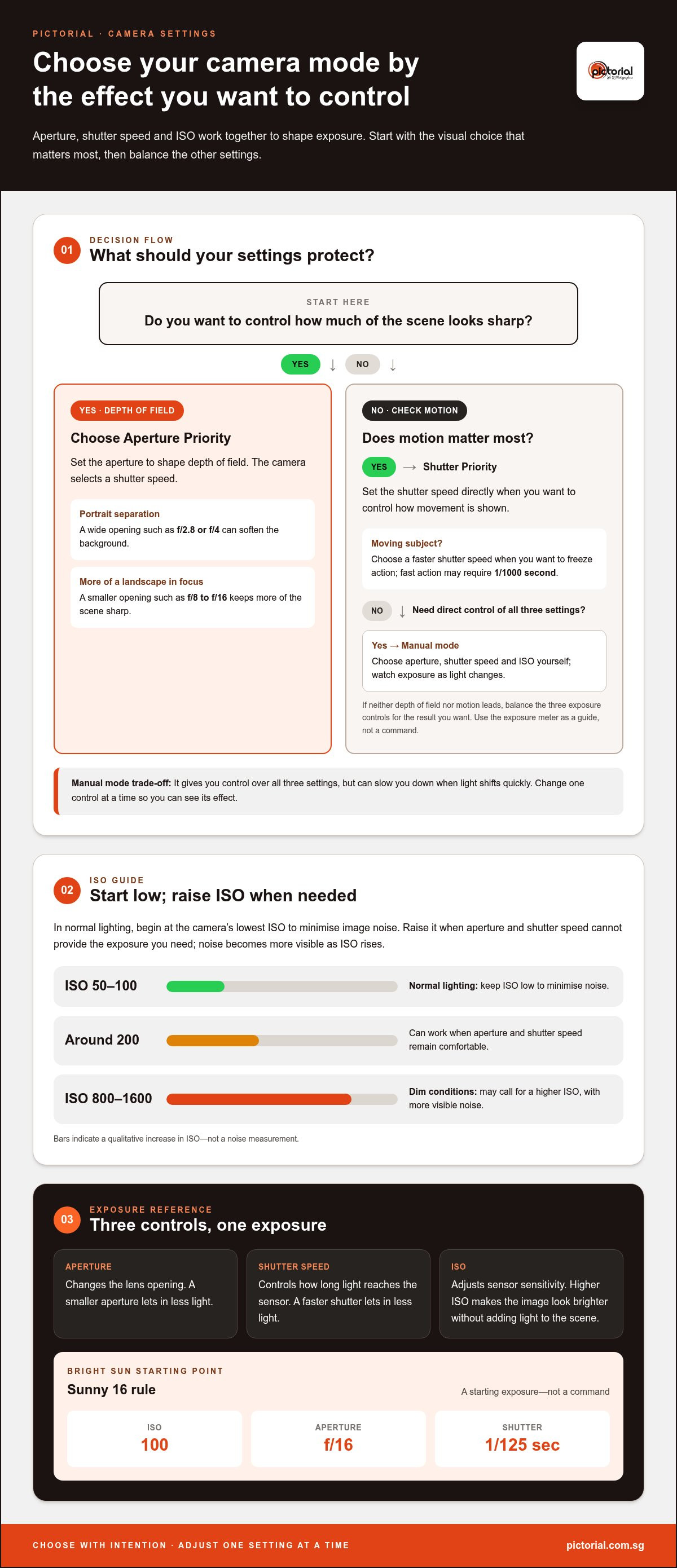
Manual mode doesn’t make a photo darker or brighter by itself; the exposure changes when you adjust aperture, shutter speed, or ISO. A smaller aperture or faster shutter lets in less light, while a higher ISO makes the image look brighter without adding light to the scene. As you work on mastering manual mode camera settings, the Sunny 16 rule offers a starting point in bright sun: ISO 100, f/16, and 1/125 second.
It’s normal to feel unsure when changing camera settings seems to affect everything at once. Adjust one control with a clear purpose, then notice how exposure and movement in the frame respond.
This guide explains how to set exposure, choose a shutter speed for stillness or motion, and balance aperture with ISO. You’ll also learn when Manual mode gives you creative control, when it may slow you down, and how structured practice can make each adjustment feel more familiar.
Key Takeaways
- Balance aperture, shutter speed and ISO deliberately, then use the exposure meter as a guide rather than a command.
- Choose aperture with depth of field in mind: a wider opening can separate a portrait subject from the background, while a smaller opening can keep more of a landscape sharp.
- Set shutter speed according to the motion you want to show, and adjust the other exposure controls to support that choice.
- Manual mode is useful when you want consistent control across changing compositions, but it can slow you down when light shifts quickly.
- Build confidence by changing one setting at a time and noticing how each adjustment affects brightness, focus and motion.
What is Manual Mode?
Manual mode lets you choose aperture, shutter speed, and ISO instead of letting the camera set them automatically. Mastering manual mode camera settings begins with understanding how each choice affects exposure and the photograph’s appearance.
-
Understand Aperture and Depth of Field
Choose an aperture based on how much of the scene should look sharp. A wide opening such as f/2.8 or f/4 can separate a portrait subject from its background; f/8 to f/16 keeps more of a landscape in focus. Check the foreground and background before taking the shot, because focus depth also changes with your distance from the subject. Practising this choice helps connect aperture to the image, not just the meter reading.
-
Learn the Exposure Triangle
Set aperture, shutter speed, and ISO as three connected exposure controls. Aperture changes the lens opening, shutter speed controls how long light reaches the sensor, and ISO adjusts the sensor’s sensitivity. For a sunny starting point, the Sunny 16 rule pairs ISO 100, f/16, and 1/125 second. If you change one setting, review the other two and the resulting exposure. This connection is the foundation for mastering manual mode camera settings without relying on guesswork.
-
Balance Aperture, Shutter Speed, and ISO
Decide what matters most in your photograph, then protect that choice as you balance the other settings. For a portrait, use a wide aperture for a softer background; for a landscape, choose a smaller opening for greater depth of field. Set shutter speed to manage movement, then adjust ISO to reach the exposure you want. Check the preview for lost highlights or deep shadows, and change one control at a time so you can see its effect.
-
Choose an ISO Range
Keep ISO at the camera’s lowest setting, such as ISO 50 or ISO 100, in normal lighting to minimise image noise. What ISO range should you use to minimise noise? Start low, then raise it only when aperture and shutter speed can’t provide the exposure you need. ISO around 200 can work when those settings remain comfortable; dim conditions may call for ISO 800 or ISO 1600, with more visible noise as ISO rises.
- Choose Aperture Priority when you want to set depth of field while the camera selects a shutter speed. Choose Shutter Priority when motion matters most and you want to set shutter speed directly. Manual mode gives you control over all three settings, but requires you to watch exposure as light changes. A practical guide suggests Aperture Priority mode for 95% of situations and Manual Priority mode for 5% of special situations. Try each mode on a familiar subject, then compare how much control and attention each requires.
Building confidence and commitment to manual photography
Confidence comes from deliberate practice, not changing every setting at once. Use these steps to connect your creative intention with the choices you make while shooting.
- Before raising the camera, choose one photographic intention. For a portrait, decide whether you want the subject softly separated from the background or the setting in detail. For a moving cyclist, decide whether to freeze the action or show motion. Naming your goal gives each setting a purpose. After taking a frame, check whether it conveys that choice, rather than judging it only by brightness.
- Practise in a familiar place and repeat one composition as the light changes. At Singapore’s golden hour, warm, low-angle light can shift across a subject, so watch the highlights and shadows between frames. During blue hour, the cooler ambient light may make the scene darker. Adjust your exposure deliberately, then compare the results; this builds a practical record of how changing light affects your photographs.
- Build a reliable habit by making one controlled change at a time. Photograph the same subject, keep two settings steady, and change the third to see its effect. For example, try a different aperture while keeping the framing and subject fixed, then compare the background detail. Repeat the exercise on another outing. This routine helps you recognise cause and effect without treating every missed frame as a failure.
- Prevent camera shake by matching shutter speed to your handholding and lens. A speed of at least 1/60 second can help reduce blur from hand movement. Another starting rule matches the shutter speed to the lens focal length: with a 50mm lens, try at least 1/50 second. Moving subjects need faster speeds; freezing fast action may require 1/1000 second. Check sharpness on playback and adjust if the subject or camera moved.
- Keep a short field note after each practice session. Record the scene, your chosen settings, and what you would change next time. Note whether blur came from camera shake or subject movement, since each calls for a different adjustment. If you learn more easily with guidance, the Basic Photography Workshop can provide structured practice with core camera skills.
What does the camera do to make the image underexposed (darker) or overexposed (brighter)?
The camera records a darker or brighter exposure depending on how much light reaches the sensor and how the meter reads the scene. In Manual mode, you control aperture, shutter speed, and ISO, then judge the result against your intended highlights and shadows.
-
Read the Exposure Meter
Point the camera at your subject and check the exposure scale before taking a photograph. Modern cameras offer several metering modes, each assessing different areas of the frame. A bright window behind a face can skew an overall reading, so meter for the face and review the highlights. The meter is a guide, not a command: snow or a white wall may need a brighter exposure than the reading suggests.
For each scene, choose a focus point on the subject, set white balance to suit the light source, and select a metering mode that prioritises the subject or scene. For night photography and astrophotography, use manual focus and a wide aperture. Choose a shutter speed based on whether you want stars to appear as points or trails, then raise ISO as needed and review the result.
-
Balance the Exposure Triangle
Adjust aperture, shutter speed, and ISO according to the detail you want to preserve. If the image is too dark, widen the aperture, use a slower shutter speed, or raise ISO; for a brighter image, reverse one of those changes. One f-stop equals 1 EV, so each full-stop change alters exposure by one step. Protect highlights when they contain important detail, rather than brightening every shadow automatically.
A common beginner mistake is changing several controls at once, then losing track of what caused the result. Change one setting, take a test frame, and inspect it before adjusting another control. Check that the metering mode suits the subject, especially when a bright or dark background fills much of the frame.
-
Use Exposure Compensation
Use exposure compensation when an automatic exposure mode consistently makes a scene too bright or dark. A change of +1 EV or -1 EV changes the light entering the camera by one f-stop; +0.3 EV or -0.3 EV changes it by one-third of an f-stop. In fully manual exposure with fixed ISO, correct brightness by changing aperture, shutter speed, or ISO instead.
-
Apply the Sunny 16 Rule
Start with ISO 100, f/16, and 1/125 second in bright sun, as the Sunny 16 rule suggests. This gives you a manual exposure baseline; adjust shutter speed or aperture if your creative choice calls for a different balance. For the sunny-day example, set white balance to 5260, then review skin tones and highlights on the camera display.
In dim light, a higher ISO may help when you need to keep a faster shutter speed or smaller aperture. Whatever the scene, check focus, exposure, and important highlights in a test frame before continuing.
Shutter speed for exposure and motion control
Choose a shutter speed to show the movement you want, then balance exposure around it. A fast setting can freeze action, while a slower one records movement as blur.
-
Choose a Speed for Moving Subjects
Start by deciding whether your subject should look still or show movement. A fast-moving subject may need at least 1/1000 second to freeze its action; birds in flight are a useful practice subject. For a moving car, try a slower speed such as 1/160 second or 1/30 second to create motion blur, then compare how much movement each frame records.
Keep the camera steady while tracking the subject, and take several frames as it crosses the composition. If the subject looks blurred, raise the shutter speed and make another test. If the background and subject both blur, camera movement may be part of the cause. A comparison between 1/25 second and 1/100 second shows how a faster shutter can produce a sharper result, though the subject’s own speed still matters.
For a sunny-day starting point, a shutter speed around 1/500 second can help manage bright light while keeping action relatively crisp. Treat it as a starting value, not a fixed answer: a walking person and a fast bird move differently. Review the subject’s edges on playback, then adjust the shutter until the amount of blur supports your intention.
-
Balance Shutter Speed and Exposure
Shutter speed controls how long light reaches the sensor. A faster shutter lets in less light and can darken the image; a slower one lets in more light and can brighten it. If you choose a faster speed to freeze motion, open the aperture or raise ISO if the exposure becomes too dark.
For handheld photography, start at 1/60 second or faster to reduce blur from hand movement. A useful rule matches shutter speed to lens focal length: with a 50mm lens, try at least 1/50 second. At 100mm, around 1/200 second is a suggested starting point for reducing camera shake. Your grip, subject movement, and camera stabilisation also affect sharpness.
Make one adjustment at a time. If a frame at 1/25 second shows shake, test 1/100 second and inspect the result. If that faster setting makes the image too dark, change aperture or ISO rather than returning to a shutter speed that blurs the subject. For a portrait example, f/2.8 and 1/500 second combine a wide aperture with a quick exposure, helping keep a person sharp while separating them from the background.
Benefits and limitations of manual camera mode
Manual mode gives you direct control over exposure, but using it takes attention. Choose it when consistency or a deliberate creative decision matters, and recognise when changing light calls for a quicker approach.
- Use Manual mode when several frames need the same exposure. In steady light during a portrait session, set the exposure once, then keep the subject’s brightness consistent as you change the framing. This prevents the camera from brightening or darkening each frame in response to a changing background. Check the subject’s skin, highlights, and shadows in a test shot before continuing.
- Choose Manual mode when the camera’s meter may be influenced by a bright or dark part of the scene. A performer against a spotlight, for example, may appear too dark if the meter prioritises the bright background. Set exposure for the performer, review the result, and adjust to retain detail where it matters. This control supports your intention, but still calls for careful observation.
- Use manual settings to shape the photograph, not simply to make the meter sit at zero. A darker exposure can preserve the mood of a dim room, while a brighter one can reveal detail in a shaded face. Compare the preview with the scene and decide which tones should remain visible. The camera’s meter is a reference, not a creative verdict.
- Manual mode has a limitation when light changes quickly. Moving from a shaded walkway into bright sun can make fixed settings produce an overexposed frame. Check the exposure scale and preview after the change, then adjust before the next important moment. If people move between areas with different lighting, a semi-automatic mode can reduce the time spent resetting exposure.
- Protect important moments from missed frames. At a family gathering, people may move between a window and a darker room. Manual exposure can keep a consistent look in one lighting area, but fixed settings may not suit both. Prioritise the moment, then choose a mode that lets you respond at the speed the scene requires.
- Review every test frame for exposure and intent. If a bright sky loses detail while the foreground remains too dark, decide which area matters most before changing settings. If shadows create the mood you want, don’t brighten them automatically. Manual mode is most useful when every adjustment serves a clear purpose, and less useful when managing settings distracts from the subject.
Practise manual exposure with guided photography instruction
Pictorial: Photography Starter Session
Pictorial’s Photography Starter Session gives beginners practical guidance in core camera settings, including aperture, shutter speed, and ISO. If you understand exposure basics but feel hesitant about changing settings in the field, guided practice can help you connect each adjustment with the result on your camera display.
Tuition includes practical outdoor guidance in small 3-person groups, where you can practise with your own camera or use a complimentary loaner camera. This hands-on approach suits learners who want to work through exposure choices while photographing real scenes. If you’re ready to practise with support, contact Pictorial to discuss the Photography Starter Session.
Keep practising with purpose
Your next step can be a simple one. Choose a subject you enjoy photographing, make a clear creative choice, and notice how your decisions shape the result. As you continue mastering manual mode camera settings, let curiosity guide you instead of expecting every frame to be perfect. A thoughtful experiment can produce a useful photograph, even when it differs from your original plan.
If you’d value structured guidance, Pictorial’s Photography Starter Session offers a practical place to begin. The Intermediate Photography Course helps learners develop further, while Mobile Photography Essentials builds skills with a phone. Choose the course that fits the camera you want to use and the experience you want to gain.
Take your camera out, make one considered adjustment, and give yourself room to learn. With practice, you’ll see more clearly what you want your photographs to say.
Frequently Asked Questions
What is Exposure Compensation?
Exposure compensation tells an automatic exposure mode to make its reading brighter or darker. A +1 EV adjustment changes exposure by one f-stop; -1 EV changes it by one f-stop in the darker direction. Use positive compensation for a backlit face that looks too dim, or negative compensation when a bright surface loses detail. In fully manual exposure with fixed ISO, adjust aperture, shutter speed, or ISO directly instead.
What do aperture, shutter speed, and ISO control in manual camera mode?
Aperture controls the lens opening and depth of field, shutter speed controls how long light reaches the sensor, and ISO affects the sensor’s sensitivity. For example, opening the aperture can brighten a dim portrait while softening its background. A faster shutter can freeze movement but reduce brightness. Once you understand each setting’s trade-off, choose the one that serves the photograph’s main purpose first.
How do you set exposure using the exposure meter and histogram?
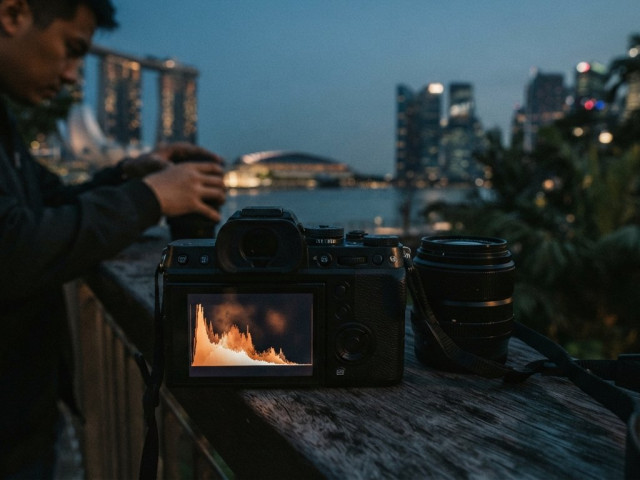
Use the exposure meter to see whether your settings place exposure above or below the camera’s reference, then inspect the histogram to understand the tonal distribution. A histogram pressed against the right edge can signal clipped highlights; one pressed against the left may indicate blocked shadows. Neither shape is automatically wrong. In a night scene, a histogram weighted to the left may preserve the intended darkness, so judge it alongside the image and subject.
What is the exposure triangle, and how do aperture, shutter speed, and ISO interact?
The exposure triangle describes how aperture, shutter speed, and ISO work together to affect exposure and image appearance. If you close the aperture to keep more of a landscape sharp, compensate with a slower shutter or higher ISO. Each choice has a trade-off: a slower shutter records movement, while higher ISO can introduce grain. Decide which visual quality matters most before balancing the other settings.
What shutter speeds prevent motion blur for people, sports, and handheld photos?
Choose shutter speed based on subject movement and camera stability. For handheld photographs, 1/60 second or faster is a useful starting point; with a 50mm lens, the focal-length rule suggests at least 1/50 second. A walking person may need less speed than fast sports action, which can call for 1/1000 second or faster. Review the subject’s edges, then adjust if movement remains blurred.
How do you choose aperture for portraits, landscapes, and low-light photography?
For portraits, try f/2.8 or f/4 when you want a softer background; check that the important parts of the subject remain in focus. For landscapes, f/8 to f/16 can keep more of the scene sharp. In low light, a wider aperture admits more light, but depth of field becomes shallower. Balance that choice against the subject’s distance and how much of the scene needs focus.
How do you use manual mode with flash or in changing light?
With flash, set the camera exposure for the ambient background first, then adjust flash output to light the subject. Take a test frame and check whether the subject and background have the balance you want. In changing light, fixed manual settings can quickly become unsuitable, so check exposure after moving between shade and sun. Aperture Priority suits 95% of situations; Manual Priority suits 5% of special situations.

Disclaimer
© Pictorial | All Rights Reserved.